ONBOARDING GUIDE
Employee Onboarding Checklist: From Offer Accepted to Day 90
A practical, owner-based checklist for preparing the employee, manager, workplace, access, documents, training, and follow-up from preboarding through Day 90.
Important: This guide provides general operational information, not legal advice. Employment requirements vary by location, industry, workforce, and situation. Confirm current requirements with qualified HR or legal professionals.
QUICK ANSWER
What belongs on an employee onboarding checklist?
A useful onboarding checklist covers more than forms. It connects the accepted offer, employee record, payroll and timekeeping setup, equipment, system access, policies, role expectations, required training, introductions, and manager follow-up.
The most important structure is simple: every item needs an owner, due date, status, and completion record. That turns onboarding from a document someone hopes to remember into a process managers can actually run.
Download the editable onboarding tracker (Excel). Assign tasks, owners, and dates, then use the status fields to review what is still open. The tracker includes fictional examples; replace them before using it for your team.
PHASE 01
Before Day 1: prepare the work, not just the welcome
Preboarding begins after the offer is accepted. Start one controlled onboarding record with the employee’s confirmed start date, role, location, manager, employment status, and the people responsible for HR, payroll, IT, facilities, and role-specific training.
Preboarding checklist
- Confirm the final role, manager, location, schedule, start date, and first-day instructions.
- Create the employee profile and identify which information belongs in restricted personnel records.
- Prepare payroll and the approved clock-in and clock-out process for the employee’s work arrangement.
- Assign equipment, workspace, badge, keys, uniform, or other physical resources.
- Request email, Microsoft 365, line-of-business applications, and role-based access with a named approver.
- Assign required policies, acknowledgments, safety training, and role training with versions and due dates.
- Build the first-week calendar, manager check-in, introductions, and early work priorities.
For U.S. hires, assign a qualified owner to confirm current government instructions, timing, and exceptions for employment eligibility and tax forms. Use the new-hire paperwork checklist to track the packet and its review without treating forms as the whole onboarding process.
PHASE 02
Day 1: give the employee clarity and a working environment
The first day should answer four questions: What am I responsible for? How will success be measured? Where do I find what I need? Who helps when something is blocked?
Confirm essentials
Verify contact information, required forms, payroll instructions, schedule, location, and the correct timekeeping method.
Test access
Have the employee sign in to required systems. Record missing access as an owned task instead of leaving it in chat or email.
Explain expectations
Review the role, near-term priorities, performance standards, communication rhythm, and who approves work.
Start required learning
Assign policy, safety, privacy, security, and role-specific training in a format the employee can understand.
PHASE 03
The first week: close gaps while they are still small
By the end of the first week, the manager should know whether the employee has the access, context, training, and support needed to begin contributing. Review open items together rather than assuming silence means everything worked.
- Confirm every required account works and matches the employee’s role.
- Review the first assignments and what a good result looks like.
- Check that the employee understands scheduling, attendance, time entry, and approval procedures.
- Record completed training, acknowledgments, questions, and any follow-up assignment.
- Set the next manager check-in before the week ends.
PHASE 04
Days 30, 60, and 90: keep onboarding connected to performance
A calendar reminder is not enough. Each check-in should compare progress with the expectations already communicated, record what is going well, identify what remains unclear, and assign specific next steps.
Readiness
Confirm access, required documents, core training, role understanding, and immediate support needs.
Progress
Review work quality, consistency, collaboration, unresolved training, and measurable progress toward role outcomes.
Next chapter
Summarize the onboarding period, document feedback, close remaining tasks, and set the next performance goals.
When managers later need to document performance, the onboarding record provides useful context: the standard communicated, training assigned, tools provided, follow-up completed, and employee questions recorded. Continue with our guide to documenting employee performance.
REUSABLE TEMPLATE
How to structure the onboarding tracker
| Task | Owner | Due | Status | Completion record |
|---|---|---|---|---|
| Payroll and timekeeping setup | Payroll | Before Day 1 | Not started / Ready / Complete | Setup confirmed |
| Account and resource access | IT + manager | Before Day 1 | Requested / Approved / Active | Access test |
| Required training | Manager | Role-specific | Assigned / In progress / Complete | Completion date |
| 30-day check-in | Manager | Day 30 | Scheduled / Complete | Notes + next steps |
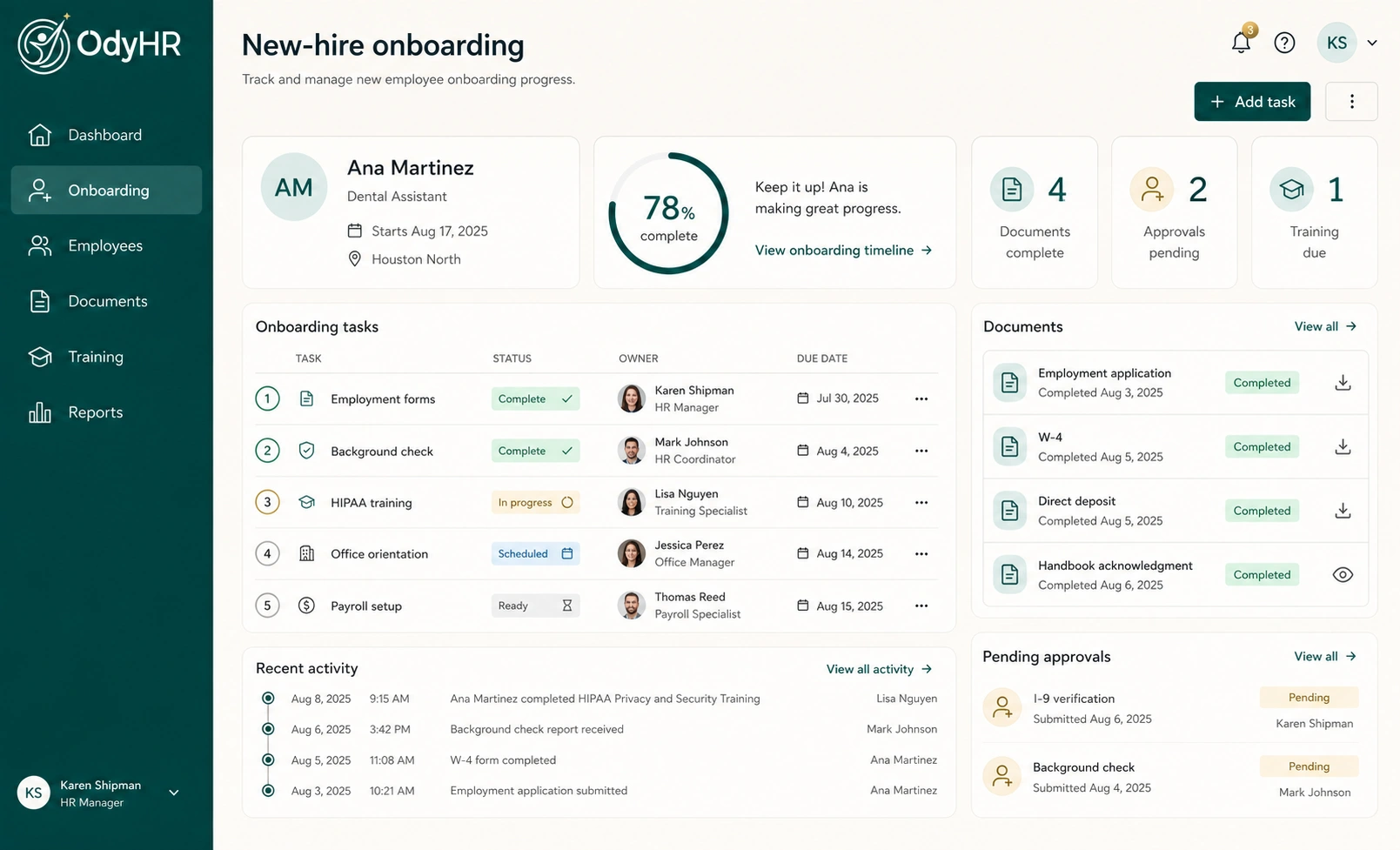
OdyHR is designed to keep these owners, dates, documents, training items, approvals, and follow-ups connected to one employee workflow. Explore employee onboarding in OdyHR. For the underlying records, use our employee-file organization guide.
USE THE FREE TRACKER
Watch an onboarding handoff move from open to verified
Follow a fictional access task in the downloadable workbook. The walkthrough shows how to name an owner, keep an unresolved action visible, and record what confirmed completion.
Follow the steps in your own copy
- Assign the work. Name the accountable owner, set the due date, and describe what will count as complete.
- Keep a blocked handoff open. If an account exists but the required access is missing, record the next action and who can approve it. Do not mark the task complete yet.
- Check the real outcome. After the approved change, test the intended action. Record the completion date and evidence only when that check succeeds.
The spreadsheet coordinates the work; it does not change another system’s permissions. Adapt the fictional example to your process and keep sensitive documents in your approved records system.
Download the editable tracker (Excel)
Open the tutorial watch page · Read the tutorial transcript · Download the video
CHOOSE WHAT YOUR TEAM NEEDS
Is a shared checklist enough, or do we need onboarding software?
A shared checklist can be enough when someone owns the process, the team can find the current version, and everyone can see what still needs attention. Start with the free tracker and run one fictional hire through it.
Review what happened. Did a task wait because the next owner was unclear? Did people update different copies? Could the manager find the completion record without searching through messages?
If the checklist works, keep using it. If those problems recur, write down the workflow you need before comparing software: who assigns work, who completes it, who checks it, and where the approved record belongs.
Use the same fictional example in each product demonstration. Ask the provider to show the incomplete item, its owner, the handoff and the completed record. That makes the comparison about your team’s work rather than the length of a feature list.
Download the onboarding tracker (Excel) or explore the fictional OdyHR demo. If you already use an HR or payroll system, check what your current tools can do before adding another subscription.
FICTIONAL WORKED EXAMPLE
Who owns onboarding: HR, the manager or IT?
Onboarding crosses several roles. Give each task one accountable owner, then make approvals and handoffs explicit. HR can coordinate the packet, a manager can confirm what the role needs, and IT can carry out approved system changes. Your organization may assign those responsibilities differently.
The example below shows why a task’s owner and its completion check are separate decisions: an account can exist while the employee still cannot do the intended work.
Alex Chen is a fictional coordinator starting at a second company location. HR has reviewed the assigned packet, the manager has prepared a first-week schedule, and IT has created an account. During the Day 1 sign-in test, Alex can open email but cannot access the supply-request system.
| Stage | Owner | Record |
|---|---|---|
| Identify the gap | Manager | Day 1: account exists, but the required location group is missing |
| Approve the request | System owner | Confirm the role and location permissions Alex needs |
| Make the change | IT | Add the approved access and record the completion time |
| Verify readiness | Alex + manager | Complete an approved test and confirm the intended workflow works |
The manager marks the task complete after the access test, not merely after IT sends a message. If the issue remains open, the task retains an owner and follow-up time, and the manager adjusts the first assignment accordingly.
This is an operational example, not a customer result or a claim that OdyHR directly provisions accounts. Account changes still belong to the authorized system owner.
REDUCE AVOIDABLE WAITING
How to speed up onboarding without skipping checks
Look for delays caused by unclear handoffs: a request waiting for approval, a document sent in the wrong version, or a manager discovering missing access on the first morning. Improving those handoffs is more useful than asking everyone to move faster.
- Prepare reusable tasks by role. Keep a base checklist and add the location or role-specific steps that actually apply.
- Start independent work together. Once the necessary approvals exist, equipment preparation, welcome instructions, and calendar planning need not wait for one another.
- Make dependencies visible. Account access may require manager approval; training may require the account to work. Record that order.
- Review blockers before Day 1. Give each gap an owner, a next action, and a time to check again.
- Improve after each hire. Ask the employee and owners which instruction or handoff caused confusion, then update the template.
Measure your own completion times before claiming an improvement. A shorter checklist is useful only if the employee still has the documents, tools, context, and support needed for the role.
WATCH FOR THESE
Six onboarding gaps that create unnecessary work
- No owner: a task exists, but nobody is accountable for completing it.
- No due date: access or equipment is requested without a clear readiness deadline.
- Forms equal onboarding: paperwork is finished, but the employee still lacks context, tools, or expectations.
- Verbal-only handoffs: questions and decisions disappear after a meeting.
- No completion record: the team cannot tell which policy, training version, or access request was completed.
- No follow-up: the process ends after the first week instead of continuing through role readiness.
If a task matters to readiness, give it an owner, due date, visible status, and documented finish.
Use the same disciplined structure at the other end of the employee lifecycle with our employee offboarding checklist.
AUTHORITATIVE REFERENCES
Sources used for this guide
- Instructions for Form I-9, Employment Eligibility VerificationU.S. Citizenship and Immigration Services ↗
- Form W-4, Employee's Withholding CertificateInternal Revenue Service ↗
- Recordkeeping and ReportingU.S. Department of Labor ↗
- Training Requirements in OSHA StandardsOccupational Safety and Health Administration ↗