A shared view of readiness
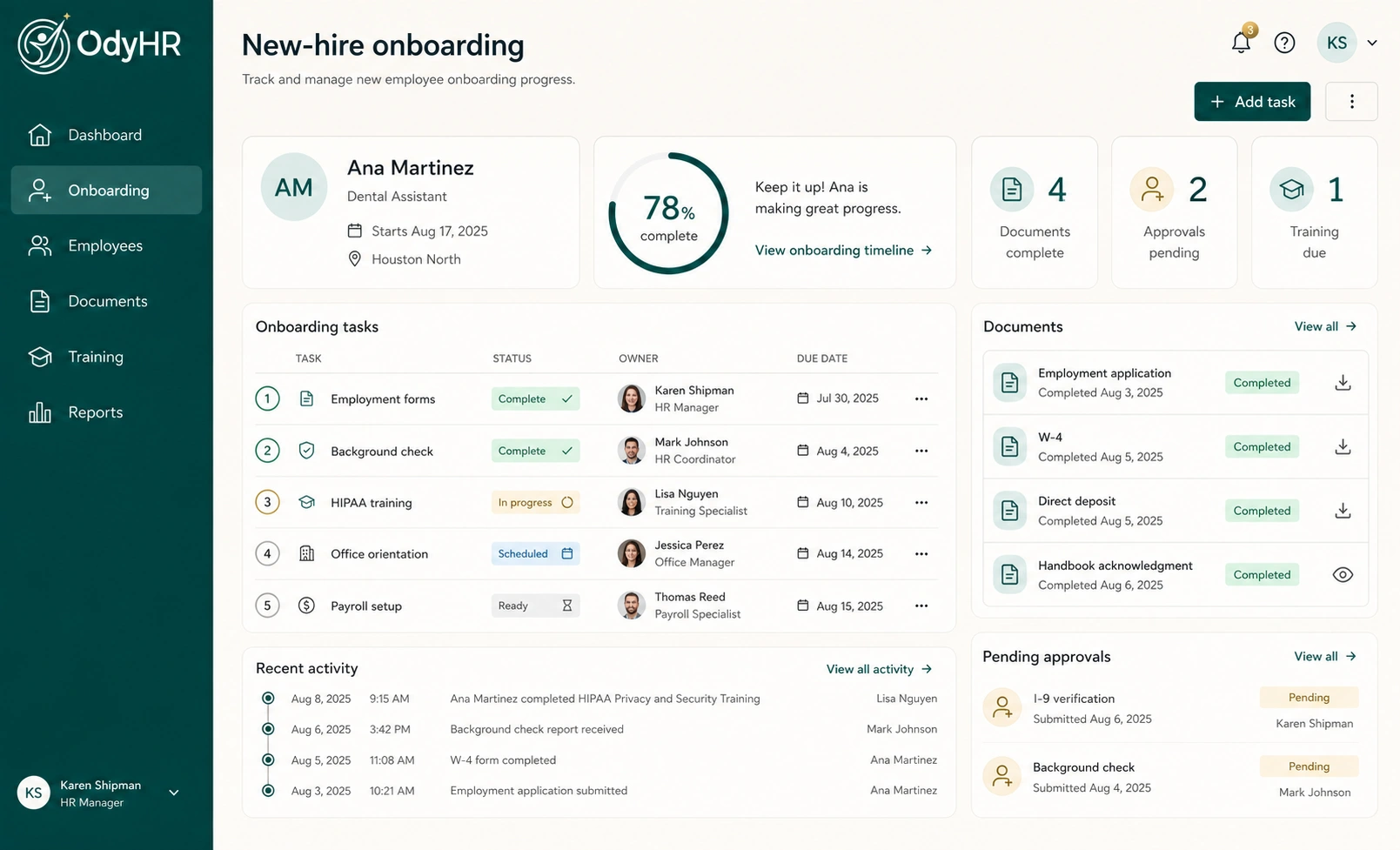
Follow onboarding work with task status, owners, and due dates. Review outstanding items before the start date and use the same record to follow up after the employee joins.
 Request pricing
 EMPLOYEE ONBOARDING SOFTWARE
THE WORK, CONNECTED
Follow onboarding work with task status, owners, and due dates. Review outstanding items before the start date and use the same record to follow up after the employee joins.
Keep employee details and onboarding documents connected to the person they belong to. Managers can review the record alongside the tasks and training that still need attention.
Give account setup and resource-access requests an owner. Track those responsibilities as part of onboarding so equipment, accounts, and the first-day plan have a clear follow-up path.
HOW THE WORKFLOW FITS TOGETHER
Review the role, location, start date, and responsible manager at the hiring handoff. Settle missing information before it holds up the next person’s work.
Identify the documents, account and access tasks, and training to complete. Give each step an owner and a due date that reflects when the employee actually needs it.
Check the outstanding work with the manager before day one. Distinguish a document that has been requested from one that has been completed, and record the next action.
Use the employee record to carry open tasks into the first week. Keep training progress and manager follow-up connected as onboarding becomes ongoing employment.
A WORKED EXAMPLE
Jordan Ellis is joining a fictional operations team. This example shows how to define the work before setting up an onboarding workflow; the dates are planning choices for this example.
| Action | Owner | Timing | What completes it |
|---|---|---|---|
| Confirm role and start date | HR coordinator | Before the first day | Employee details reviewed with the manager |
| Review assigned documents | Jordan + HR coordinator | At the agreed onboarding deadline | Requested items returned and reviewed |
| Arrange account and equipment access | Operations / IT owner | Before access is needed | Responsible owner confirms readiness |
| Check first-week progress | Team manager | End of the first week | Open items and next check-in recorded |
Task completion should represent the work you have actually checked. Tracking an account-setup task does not automatically create an account in another system.
MAKE IT FIT YOUR OPERATION
For a small business, a practical starting point is one role and one manager. Write down the current handoffs, identify where follow-up gets lost, and bring that workflow to your product conversation.
A new employee at one location may need different equipment, access, or training from someone elsewhere. OdyHR organizes work around roles and locations; confirm your required variations during setup.
A completed document packet is one part of onboarding. A first-day plan also needs a manager, working access, introductions, and a clear next assignment. Use the onboarding checklist below to prepare both.
TRY THE SAMPLE JOURNEY
The interactive demo uses fictional people and simulated actions. It lets you inspect the handoff without sending an application or changing a real employee record.
EXPLORE THE INTERACTIVE DEMOBEFORE YOU CHOOSE
OdyHR brings together employee details, assigned tasks, documents, required training, account and resource-access responsibilities, owners, due dates, and readiness. Your specific process and setup should be reviewed before launch.
The workflow is relevant when a small team needs to coordinate hiring and onboarding without losing track of responsibility. Bring your team size, locations, and current handoffs to a pricing conversation so you can assess fit and setup needs.
The onboarding workflow records account and resource-access tasks and their completion. Automatic provisioning in other applications is not included in the capability described here; discuss any integration requirement separately.
Yes. The interactive demo is a guided, fictional sample journey. Use Request pricing when you want to discuss your own workflow, team size, and implementation needs with OdyHR.
LET’S TALK THROUGH YOUR WORKFLOW